

How a JL7 withdrawal to GCash passes the name check

A JL7 withdrawal takes ₱100 to ₱49,999 per request on GCash, up to 100 withdrawals a day, and the money goes only to an account whose name matches your Withdrawer Name. You upload no documents, so the name you type in Personal Information is the check. The steps below therefore start with the name, and a balance above ₱49,999 needs a split before the first request.
Three rules can stop your first JL7 withdrawal before the amount matters
For a GCash casino, how to withdraw starts with three rules, and each rule fails at a different place and at a different cost. You receive a withdrawal at JL7 only when all three line up.
An e-wallet, which is a money account kept in a phone app such as GCash or Maya, counts as a payout account in the same way as a bank account. The table sorts the three rules by where you set each one and what you lose when one slips.
| Rule | Where the rule lives | If the rule slips |
|---|---|---|
| The Withdrawer Name matches the receiving account | Personal Information, where a red warning stresses the match | The withdrawal fails |
| A payout account is linked | The Link E-wallet or Bank Account settings, or Add wallet on the Withdraw tab | You have no account to send to |
| Bank or card details stay unchanged until your first withdrawal is done | The promotion terms; you would make a change on the Bank Account screen | You forfeit every bonus and all winnings |
You type the Transaction Password, a second password separate from your login password, at two points: when you link a payout account and whenever you withdraw at JL7. Use the spelling your receiving wallet or bank holds, because a nickname will not match.
So set the name first, link the account that carries that name, and leave the bank details alone until your first payout has landed.

Link a payout account for a JL7 withdrawal, and why crypto cannot be one
The second rule is where the name meets a real account: the payout account that every JL7 withdrawal goes to. You withdraw to GCash, Maya, GrabPay or Bank Account, and only when the account sits under your Withdrawer Name.
JL7 lets each member link up to 5 bank accounts and 5 e-wallets, and the bank list covers around 50 Philippine banks, including BDO, BPI, Metrobank and UnionBank. No step asks you to upload a document, and linking takes four steps:
- Set your Transaction Password in the settings of Personal Center.
- Open Link E-wallet or Bank Account. The Account Management tab also adds and edits payout accounts.
- Enter an account held in your own name, the same name as your Withdrawer Name.
- Confirm with your Transaction Password. Your account then shows on the Withdraw tab in place of the “No E-Wallet linked yet” notice.
Crypto works only for deposits, never for withdrawals at JL7. If you fund your account with USDT, TRX or ETH, you still need one of those four channels in your own name to receive the payout, so crypto only funds the account.
Which caps apply per request, day and wallet, and how to split a balance?
Once the account is linked, the amount is the next limit on a withdrawal at JL7, in three layers: the request, the day and the receiving wallet. Per request, the JL7 withdrawal limit on GCash is ₱100 to ₱49,999, with up to 100 withdrawals a day.
Remaining Number of Withdrawal Today on the Withdraw tab shows how many requests are left. Check the range on the tab before you plan a large payout to Maya, GrabPay or a bank, because ₱49,999 is the GCash figure. You pay no JL7 withdrawal fee, so splitting a balance costs nothing extra.
Your receiving wallet sets a third ceiling. According to the GCash Help Center, a Fully Verified wallet (one that passed the ID and selfie check) holds up to ₱1,000,000 and receives up to ₱1,000,000 a month, while a Basic wallet holds ₱10,000 and receives ₱5,000. The monthly limit resets on the 1st day of the following month.
Three balances show how a split works under the ₱49,999 cap. The amounts are examples, not offers.
| Balance | Split into | Why that split |
|---|---|---|
| ₱50,050 | ₱49,950 + ₱100 | ₱49,999 + ₱51 fails, because the last request must reach the ₱100 minimum |
| ₱80,000 | ₱49,999 + ₱30,001 | Two requests, both inside the range |
| ₱120,000 | ₱49,999 + ₱49,999 + ₱20,002 | Three requests; the first alone is about ten times what a Basic wallet receives in a month |
Split every withdrawal at JL7 so the last request still reaches ₱100, and check your wallet’s tier before you send the second request.
Send the request in six steps, then see which bonuses tie to it
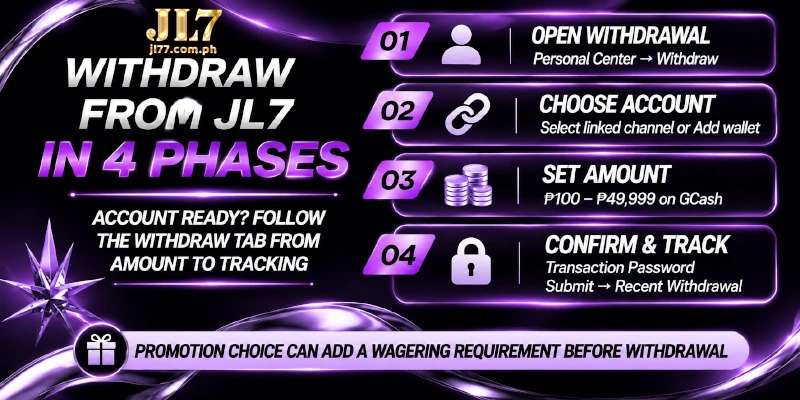
With the name set, the account linked and the amount inside the range, a withdrawal at JL7 takes six steps on the Withdraw tab:
- Open Withdrawal in the header or in Personal Center, then stay on the Withdraw tab.
- Choose your linked channel, or select Add wallet if none is linked yet.
- Enter the amount, or tap a preset: 100, 200, 300, 500, 1,000, 3,000, 5,000, 10,000, 30,000 or 49,999.
- Tap Refresh Balance if the Available Amount looks out of date.
- Enter your Transaction Password.
- Submit the request, then find that request under Recent Withdrawal.
Bonuses touch a withdrawal in two ways. Member Day on the 13th and Mystery Bonus on the 27th each look for a deposit, a withdrawal and betting records in the same month.
The other way is a condition on the amount you may take out. You pick the promotion at the deposit step, and that choice attaches a wagering requirement, the amount you must bet before bonus money can be withdrawn.
Choose Do Not Participate In Any Promotions there and the deposit carries no wagering requirement, so the deposit step decides what waits for you at step six.
How long a withdrawal takes and where to follow the request
Expect a JL7 withdrawal time of a few minutes on an e-wallet, with 24 hours as the ceiling on every channel, bank accounts included. The Withdraw tab prints the same limit as Withdrawal Time: 24 hours, so a withdrawal within 24 hours counts as on time.
Count the 24 hours from the moment you submit, so a request sent at 09:00 on Monday is late only after 09:00 on Tuesday. Three places show where a request stands:
- Recent Withdrawal on the Withdraw tab tracks every withdrawal at JL7 from submission.
- My Account lists the pending withdrawals.
- 24-hour Customer Service takes over when a request is still pending after the 24 hours.
FAQ
Three questions remain after the steps and the caps: what the ₱19 voucher can take out, what VIP changes and what a Basic GCash wallet means for larger requests.
What can I withdraw from the ₱19 sign-up voucher?
At JL7, a withdrawal from the ₱19 sign-up voucher is capped at ₱150, and the minimum request is ₱100. You need your real name, your phone number and a linked GCash or Maya wallet, and the voucher carries a 5x wagering requirement on slots only; the other terms of the voucher sit on the promotions page.
Does VIP speed up a withdrawal at JL7?
VIP brings priority handling of payouts, plus priority Customer Service. JL7 states no shorter time for VIP, so the 24-hour ceiling applies at every level.
What if my GCash wallet is not Fully Verified?
Basic wallets receive only ₱5,000 a month, so a withdrawal at JL7 near the ₱49,999 cap needs a Fully Verified wallet, or a Maya or bank account in your name. The limit belongs to the wallet, so only GCash can raise that limit, by verifying the account in the GCash app.
The name you set once is the check on every later JL7 withdrawal
From the linked account to the ₱49,999 cap, every step on the Withdraw tab rests on the one name typed in Personal Information. The account that carries that name receives every payout, which is why the minute spent on the name protects each later request at JL7.


