
JL7 register from the first click to the four things still open

JL7 register takes three fields, a username, a password and a confirmation, and signs you in the moment you press Register. The popup asks for no phone number, no email and no code. The form is short because the setup comes later: a Rewards popup starts a 24-hour countdown, and three details, for withdrawals, the sign-up voucher and account recovery, are yours to add.
Username, password, age and one account: the four rules before you register
The JL7 register popup asks for a username, a password and the same password again. The popup has no field for a phone number, an email, a referral code or a one-time code (the short number a site texts you to confirm your identity).
Four rules apply before you press Register: two length limits, one age requirement and one account per member.
- Username: 6 to 13 letters or numbers, with no special characters.
- Password: 6 to 12 letters or numbers. A 13-character entry fits the username rule but is one character too long here, so cap a password manager’s generated length at 12.
- Age: registering at JL7 requires you to be 18 or over. The popup does not ask for your age; the Birthday field sits later, in Personal Information.
- One account: register at JL7 once, because we check for duplicate accounts.
Five steps take a username and password to a signed-in account
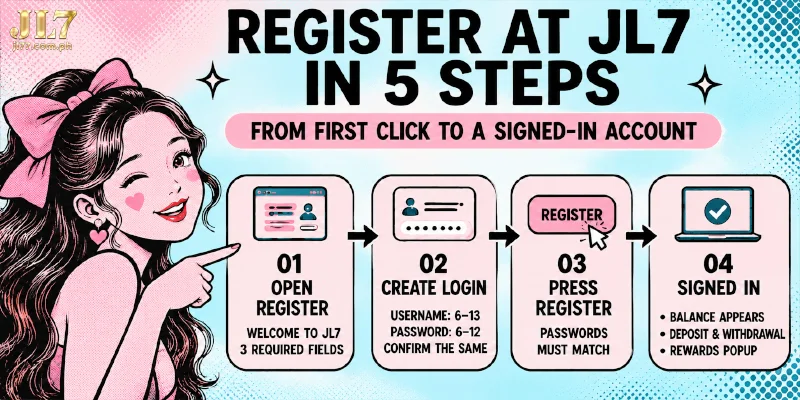
To register at JL7, you fill three starred fields from top to bottom, using a username and password that fit the four rules, and the fifth step signs you in.
- Select Register. A popup titled WELCOME TO JL7 opens with three starred fields.
- Type your username in Username*.
- Type your password in Password*.
- Type the same password in Confirm password*. If the two entries differ, the popup answers “Incorrect confirmation input” and you correct the entry.
- Select Register in the popup to finish registering at JL7. You are signed in automatically, and the header now shows your balance, the Deposit and Withdrawal buttons, the level “Ordinary member”, your username and your messages. A red-envelope Rewards popup also opens on top.
Already have an account? The footer of the same popup points to Login instead, since the one-account rule applies to every member.
Can Telegram or Google replace the three fields with one sign-in popup?
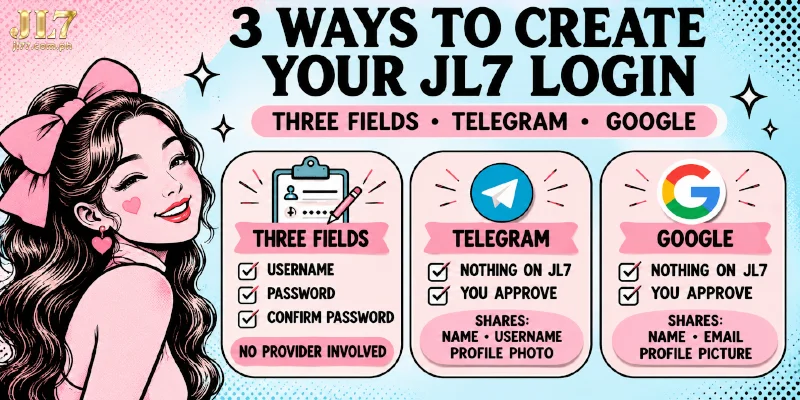
Yes, registering at JL7 with Telegram or Google swaps the three fields for the provider’s own sign-in popup.
- Open the Register popup and look under the three fields for “or connect with”.
- Select Telegram or Google.
- Approve the sign-in in the popup that Telegram or Google opens. After your approval, the account is linked.
Routes differ in what you type and in what the provider can pass on.
| Route | What you type | What the provider can pass on |
|---|---|---|
| Three fields | Username, password and confirmation | Nothing, because no provider is involved |
| Telegram | Nothing, since you approve in Telegram’s popup | Name, username and profile photo, plus a verified phone number only with your consent |
| Nothing, since you approve in Google’s popup | Name, email address and profile picture after you give permission; the Google Account password stays with Google |
Each provider passes on only what you approve in the sign-in popup, and stopping Sign in with Google later does not take back data already shared.
Choose the three fields if you would rather keep Telegram and Google out of the account, and choose a provider if you would rather skip typing a password in the register popup. The Login popup shows the same two buttons, so use a provider account you can still open later.
A new account has four things open, the first on a 24-hour timer
Sign-in is the only job JL7 register does, so four things stay open: the Rewards popup runs on a timer, and the other three wait for you. You need a linked wallet to withdraw, the same wallet and a real name for the sign-up voucher, and a saved email in Personal Information to recover the account.

Rewards popup: two tasks and a 24-hour countdown
A red-envelope Rewards popup sets a 24-hour countdown and two tasks the moment you register at JL7. The tasks are sharing to the designated list, with a count of at least 10, and a deposit count of at least 1. Neither task blocks the account, because you are already signed in when the popup opens.
The envelope is worth up to ₱77,777, which is a ceiling and not a guaranteed amount. The attached voucher stays valid for 1 day, and the envelope expires when the countdown does.
Withdrawals: a linked wallet, a second password and a matching name
You need three things before a withdrawal, and registering at JL7 collects none of them.
- A linked account: an e-wallet (a mobile money account such as GCash, Maya or GrabPay) or a bank account. The Withdrawal page shows “No E-Wallet linked yet” and an Add wallet button until you add one.
- A Transaction Password: you enter this second password when you link an account and at every withdrawal, and Personal Center, the account area, lists the setting beside Bank Account and Link E-wallet.
- A matching name: the Withdrawer Name in Personal Information must equal the name on the receiving e-wallet or bank account, and a withdrawal fails when the two differ.
If you change bank card information before your first withdrawal, you forfeit all bonuses and winnings.
₱19 voucher: four activation details, 5x on slot bets and a ₱150 cap
You need four details for the ₱19 voucher that the sign-up form never asks for: your real name, your phone number, a linked GCash or Maya wallet and the novice tasks listed in the Reward Center. The voucher stays out of reach until all four are done.
A wagering requirement is the number of times a bonus must be bet before withdrawal. For this voucher the figure is 5x, counted on slot bets only, and withdrawals from the voucher are capped at ₱150.
Email: the one skipped detail that account recovery depends on
Forgot Password on the Login popup recovers an account only when an email is already saved in Personal Information, and registering at JL7 never asks for one. Without a saved email, you contact Customer Service instead.
Personal Information holds both missing details: the Withdrawer Name that a withdrawal checks and the Email that recovery needs.
Fill the form in once, with your e-wallet or bank account name copied exactly and an email you can open, because once you are locked out you can no longer add the email.
JL7 register FAQ
These answers cover what JL7 register leaves open, from identity checks to the order of setup.
Does registering at JL7 ask for an ID?
No. The register popup has no ID field. The Personal Information form you fill in afterwards includes an ID number field, and we ask for no document upload.
Can I deposit before I link a withdrawal wallet?
Yes. The Deposit button sits in the header as soon as you register at JL7, and the first-deposit promotions you select at the deposit step ask only for the deposit amount the promotion requires, not a linked wallet. A linked wallet comes in later, for the sign-up voucher and for withdrawals.
Do I need a separate account for the JL7 app?
No. The app uses the same account as the website, so the account you create when you sign up at JL7 already works in the app.
Where JL7 register ends and account setup begins
Registering at JL7 creates the account and stops there, so everything that moves money or recovers the account sits on other screens. The Rewards popup is the only piece with a deadline; the name and email wait in Personal Information, the wallet on the Withdrawal page and the voucher tasks in the Reward Center.


